
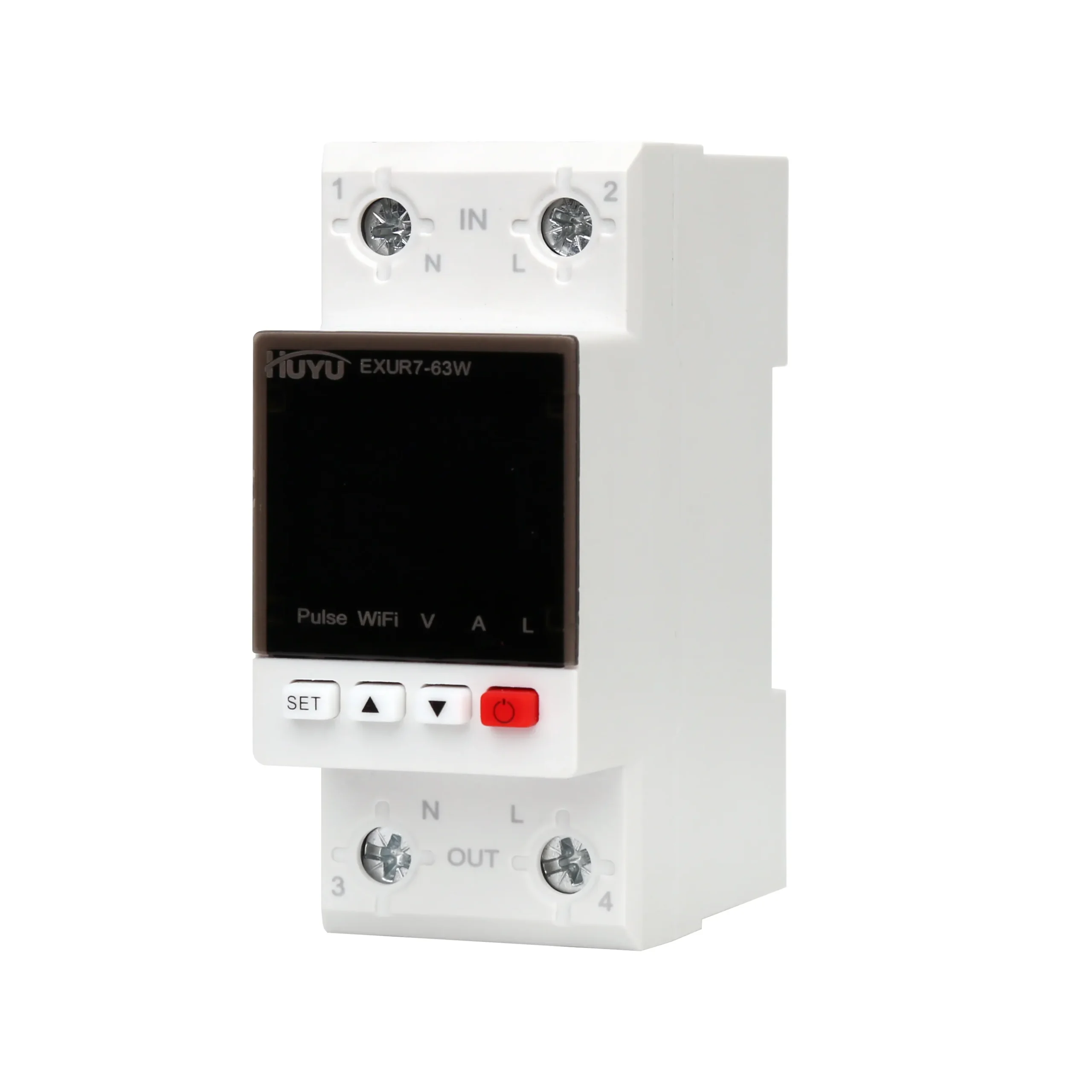
EXUR7-63W Multi-function Protector
One DIN Unit — Voltage Guard, Leakage Detector, kWh Meter & WiFi
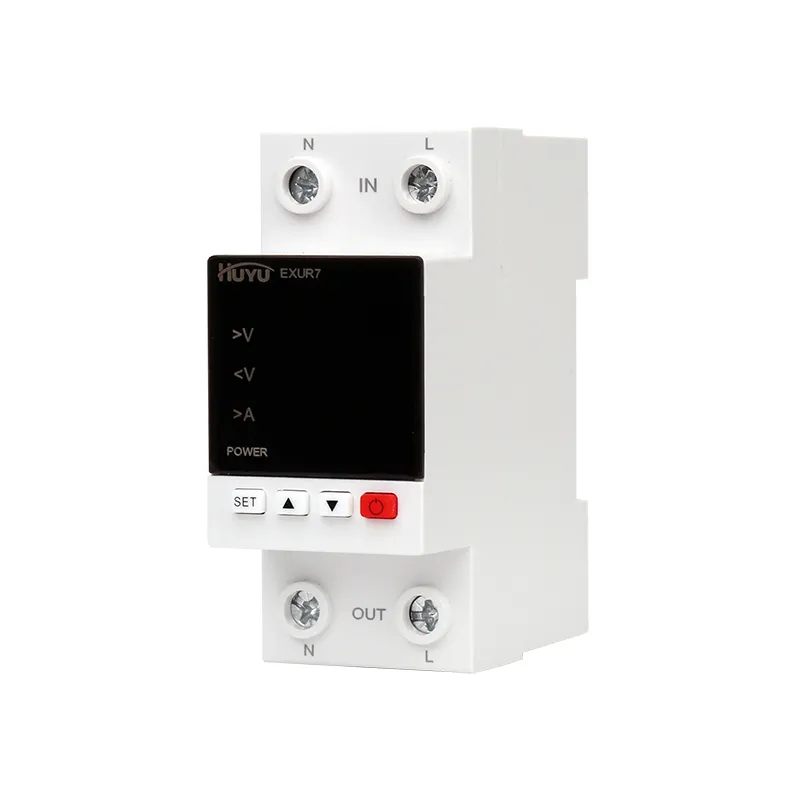
The EXUR7-63W is an intelligent multi-function protector for single-phase circuits that combines an over/under voltage protector, an overcurrent protector, a leakage detection relay and a kilowatt-hour meter in one 2P DIN module. It displays kWh, kW and power factor on its screen, measures leakage current down to 10mA, and — with built-in WiFi — reports the circuit to the Smart Life app for remote monitoring and control.
Model
EXUR7-63W Series — Multi-function ProtectorEXUR7-63W (63A rated)
AC95-300V · 63A · kWh meter · WiFi monitoring · leakage 10-100mA
Product Details
- Over/under voltage, overcurrent and leakage detection (10-100mA) combined in one 2P DIN module.
- Built-in kilowatt-hour meter showing kWh, kW and power factor with battery-backed total.
- WiFi via the Smart Life app — remote on/off, live monitoring and trip alarms on your phone.
- 63A rated, input AC95-300V; password-protected setup; mechanical life ≥100,000 cycles.
Product Information
Application
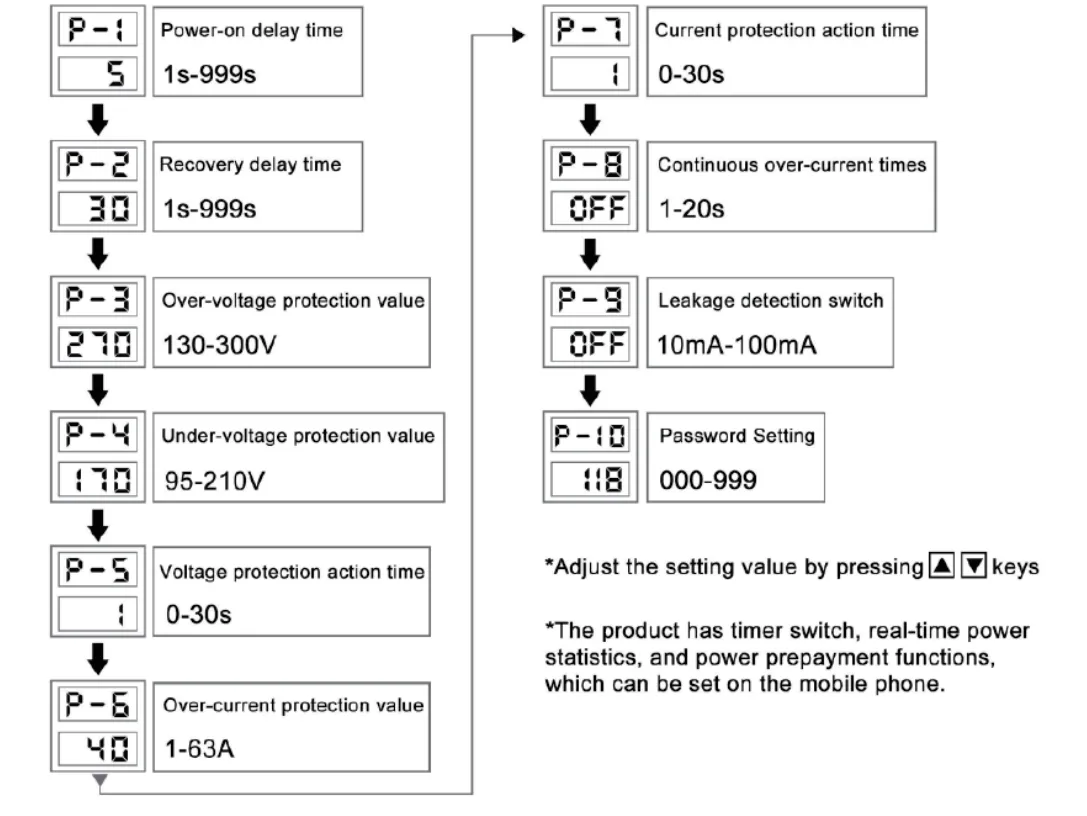
The adjustable voltage, current and leakage detection protection device, with a kilowatt-hour meter, is an intelligent protector that integrates overvoltage protec-tor, undervoltage protector, overcurrent protector and leakage detection. In the event of an overvoltage fault, undervoltage fault, or overcurrent fault, the product can immediately cut off the power supply to avoid damage to electrical equipment. The overvoltage, undervoltage, overcurrent and leakage detection switches of the product can be set by the user and adjusted according to local actual conditions.
Product Features
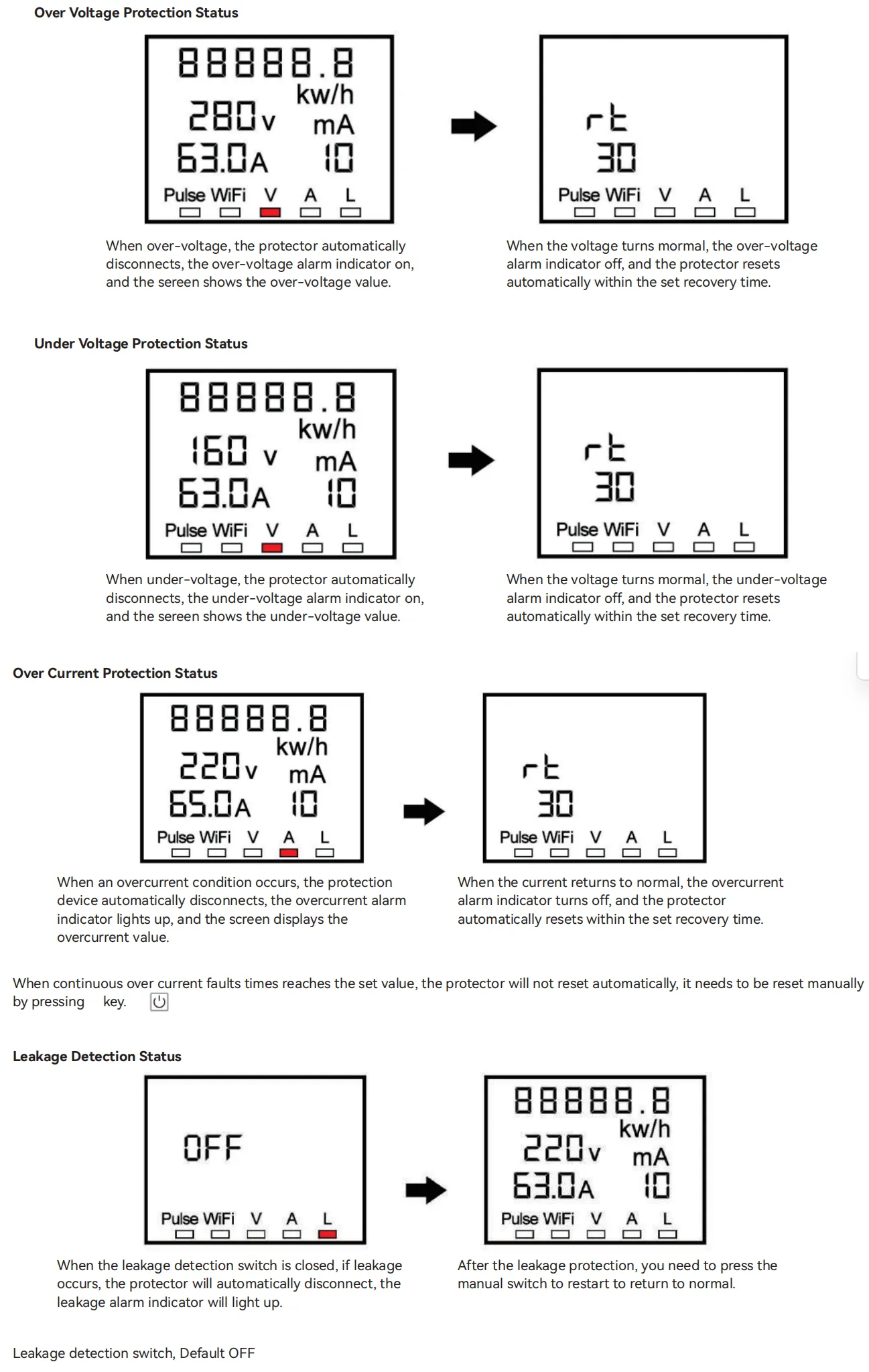
- In the case of overvoltage fault, undervoltage fault,overcurrent fault in the single-phase line, the product can disconnect the line power supply and automatically restore the line connection after a delay time after the line voltage or current returns to normal.
- In the case of instantaneous overvoltage in the line, the product can protect the equipment from misopera-tion.
- If the leakage detection switch is turned on, when the line is affected by unstable voltage or sudden power failure and power on due to loose connection and other faults, the product will disconnect the line after three seconds.
- When the line fault voltage reaches the peak, the product itself will not be damaged.
- The protector can display kilowatt-hours, KW and power factor.
Main Technical Parameter
| Function | Technical Parameter | Function | Technical Parameter |
| Input voltage | AC95-300V | Power-on delay time | 1-999s default 5s |
| Over-voltage protection value | 130-300V default 270V | Over-voltage recovery value | 125-295V default 265V |
| Under-voltage protection value | 95-210V default 170V | Under-voltage recovery value | 100-215V default 175V |
| Over-current protection value | 63A:1-63A default 40A | Continuous over-current times | 1-20 times default OFF |
| Leakage protection value | 10-100mA default OFF | Voltage protection action time | 0-30s times default 1s |
| Recovery delay time | 1-999s default 30s | Current protection action time | 0-30s times default 1s |
| Mechanical life | ≥100000 cycles | Power consumption | ≤2W |
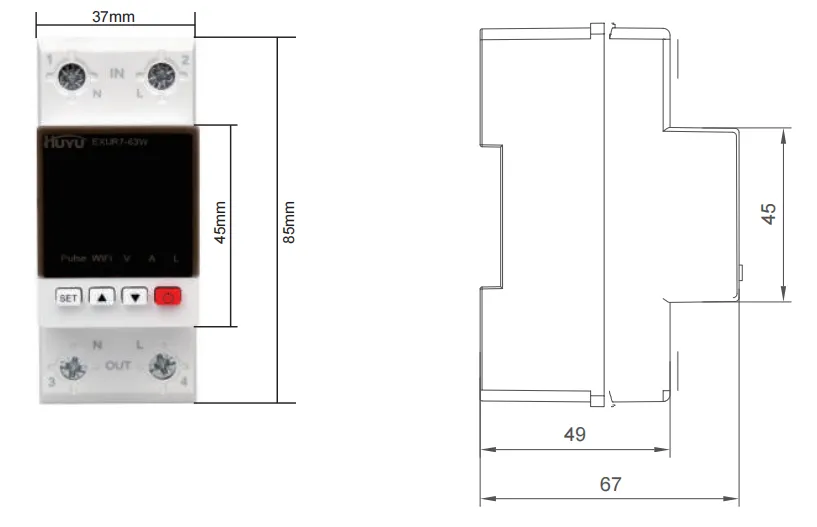
| Password Setting | 000-999 default 118 | Size | 85*37*69mm |
Setup Menu
Panel indicator lamps and keys instructions
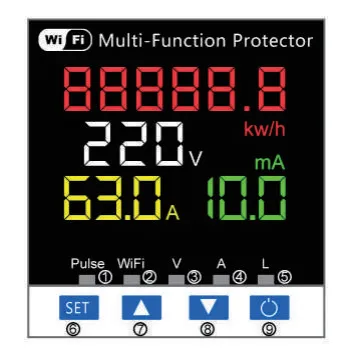
- ① Kilo-watt hour meter pulse indicator
- ②WiFi indicator
- ③ Over/under voltage alarm indicator
- ④ Over-current alarm indicator
- ⑤ Leakage alarm indicator
- ⑥ Set: Menu setting key
- ⑦Adjustment key + Press for 5 seconds and the battery power will be cleared
- ⑧ Adjustment key – Press and hold for 5 seconds, the WiFi indicator lightflashes and the device enters pairing mode.
- ⑨ Manual switch
- Press the power button to OFF, then press and hold thepower button for 5-10 seconds until it restarts to restore tofactory settings.
Screen Display Description
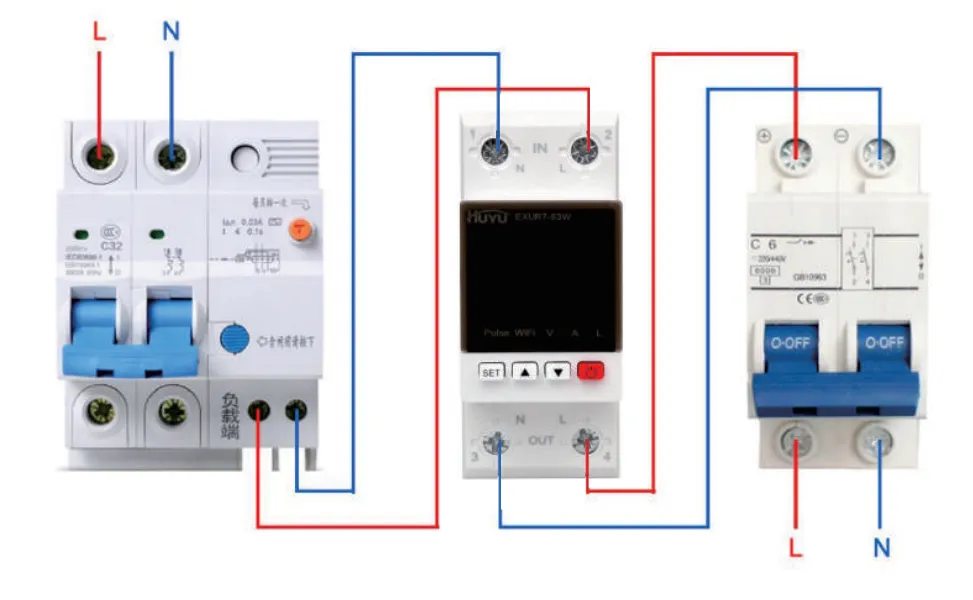
Wiring Diagram
Installation Dimension
Note
- This product is only used for leakage detection and provides only a reference for leakage values. It cannot replace the leakage protector.
- Leakage detection switch, closed by default, if you need the detection function, you need to turn it on manually
- The WiFi indicator light flashes and is in network configuration state
- The WiFi indicator light is always on, indicating that the mobile device has been connected
- To ensure service life,it is recommended to set the current parameter to 70%.
How We Support Your Business

OEM / ODM
Pre-set thresholds, retail packaging and app-coordinated branding on the WiFi multi-function platform.
App branding · Market presets · Meter calibration

Wholesale
Factory-direct pricing for smart-home distributors, energy retailers and electrical e-commerce channels.
Factory pricing · Retail packaging · Global shipping

Distributor Support
App setup documentation, marketing material and priority production for channel partners in smart electrical retail.
App guides · Marketing material · Priority lead times
Ready to Stock the EXUR7-63W?
OEM/ODM, wholesale pricing and distributor support — one enquiry gets you a factory-direct quotation for the EXUR7-63W multi-function protector, configured with your market’s thresholds and retail packaging.
Frequently Asked Questions
What is a multi-function protector?
A multi-function protector combines several protection and monitoring functions that are normally separate DIN devices. The EXUR7-63W bundles over/under voltage protection, overcurrent protection, leakage detection and a kilowatt-hour meter with WiFi connectivity in one 2P module — one part to install, one display to read, one app to monitor.
Does the leakage function replace an RCD/RCBO?
No. The EXUR7-63W’s leakage detection is a monitoring and alarm function with an adjustable 10-100mA threshold, and it provides a reference value for insulation condition. It is not a substitute for a residual current device (RCD), which must still be installed for personnel protection. Install both: the RCD protects people, the EXUR7-63W watches the circuit and reports.
How do I connect the EXUR7-63W to WiFi?
With the manual switch OFF, press and hold the adjustment key for about five seconds until the WiFi indicator flashes, then use the Smart Life app to add the device over Bluetooth/WiFi pairing and enter your network password. Once connected the WiFi indicator stays lit, and the circuit can be controlled and monitored from the app.
What energy data does the EXUR7-63W show?
The display shows live voltage and current, and the meter registers accumulated kilowatt-hours as well as instantaneous kW and power factor. The kWh total is retained with battery back-up and can be cleared by a long press of the set key when a fresh billing or test period starts.
Why does the protector sometimes stay off after a fault?
That is the continuous overcurrent counter working as designed: after the configured number of consecutive overcurrent trips (1-20), the device locks out and must be reset manually with the switch. This forces someone to investigate a repeatedly overloaded circuit instead of letting it cycle automatically — switch the counter OFF if you want unlimited auto-recovery.